Create your first design
Use the Create wizard to go from an idea to a finished card, post, video greeting, or image with AI.
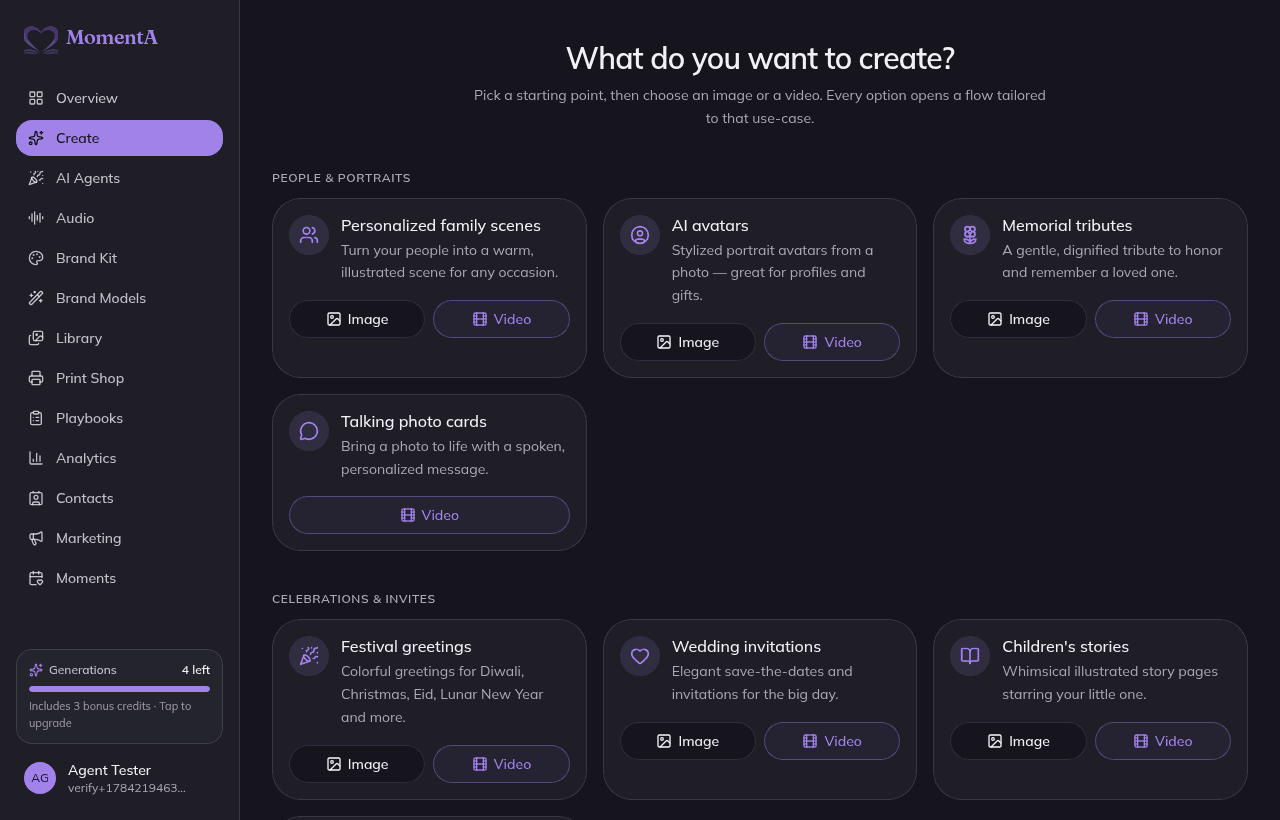
Create is where most work begins. Pick a starting point from the wizard, describe the occasion, and MomentA generates the words and artwork. Then it hands off to the editor for any final touches. The wizard supports cards, invitations, social posts, video greetings, and standalone images.
Step by step
- 1
Pick a starting point
Choose a category tile — greeting card, invitation, social post, video greeting, or image. Each tile shows Image and Video options.
- 2
Describe the moment
Say who it's for and the occasion — for example, 'a warm birthday card for my mum who loves gardening.' The more detail, the more personal the result.
- 3
Choose a tone
Pick a tone like Warm, Playful, Elegant, or Bold to steer the writing and visual direction.
- 4
Add a brand or model (optional)
Apply a Brand Kit or a trained Brand Model so the look and voice match you.
- 5
Generate
MomentA drafts the headline, message, and artwork. Regenerate any part you don't love.
- 6
Open in the editor
Send your favorite version to the editor to refine text, photos, effects, and layout.
Video greetings
Choose the Video path on any tile to create an animated greeting video. The video editor lets you set a background, overlay your card design, and add music from the audio library. See Video Studio & greetings for the full workflow.
Standalone images
Need an image without a card? Open Image Studio from the sidebar to generate, restyle, and edit images independently of the card wizard.
Be specific
The more detail you give (names, interests, the feeling you want), the more personal the result. You can always regenerate individual parts.
Note
Premium artwork and video generations draw from your monthly points allowance and any bonus or purchased point packs. AI copywriting is free and unlimited on every plan.